3. Learning Design Studio (LDS)
- 3.1 UI Overview and Terminology
- 3.2 Learning Design Facilitator and Information Window
- 3.3 Pattern Library
3.1 UI Overview and Terminology
Welcome to the Learning Design Studio (LDS)! Starting with this chapter, you will begin exploring the LDS interface and features to create your own learning design.
Main User Interface Overview
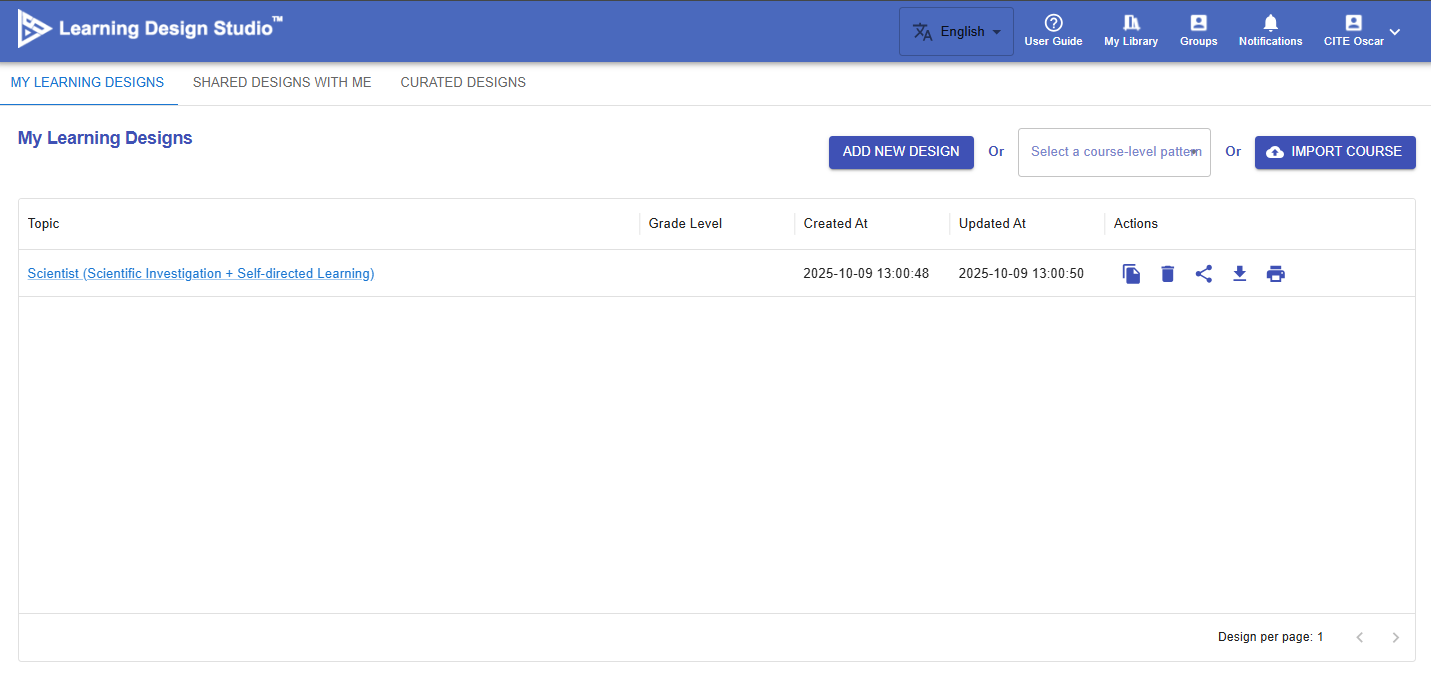
Figure 3.1: Main User Interface

|
Item |
Description |
Tutorial |
|---|---|---|
| 1. Languages |
The LDS currently supports English, Traditional Chinese, and Simplified Chinese. |
N/A |
| 2. User Guide |
A simple navigation to the LDS. |
N/A |
| 3. My Library |
You can access and manage your learning designs in one place. Create new designs, edit existing ones, and easily view designs shared with you by others. |
Ch 4-9 |
| 4. Groups |
You can create groups for your school or organization, invite members to join, and collaboratively share and co-create learning designs. |
Ch 10 |
| 5. Notifications |
You will receive a notification when there are important updates or invitations from the group. |
N/A |
| 6. Profile |
You can update your email address and display name in the LDS. |
N/A |
Learning Design Interface Overview
When you enter the Learning Design section, the user interface is divided into three panels:
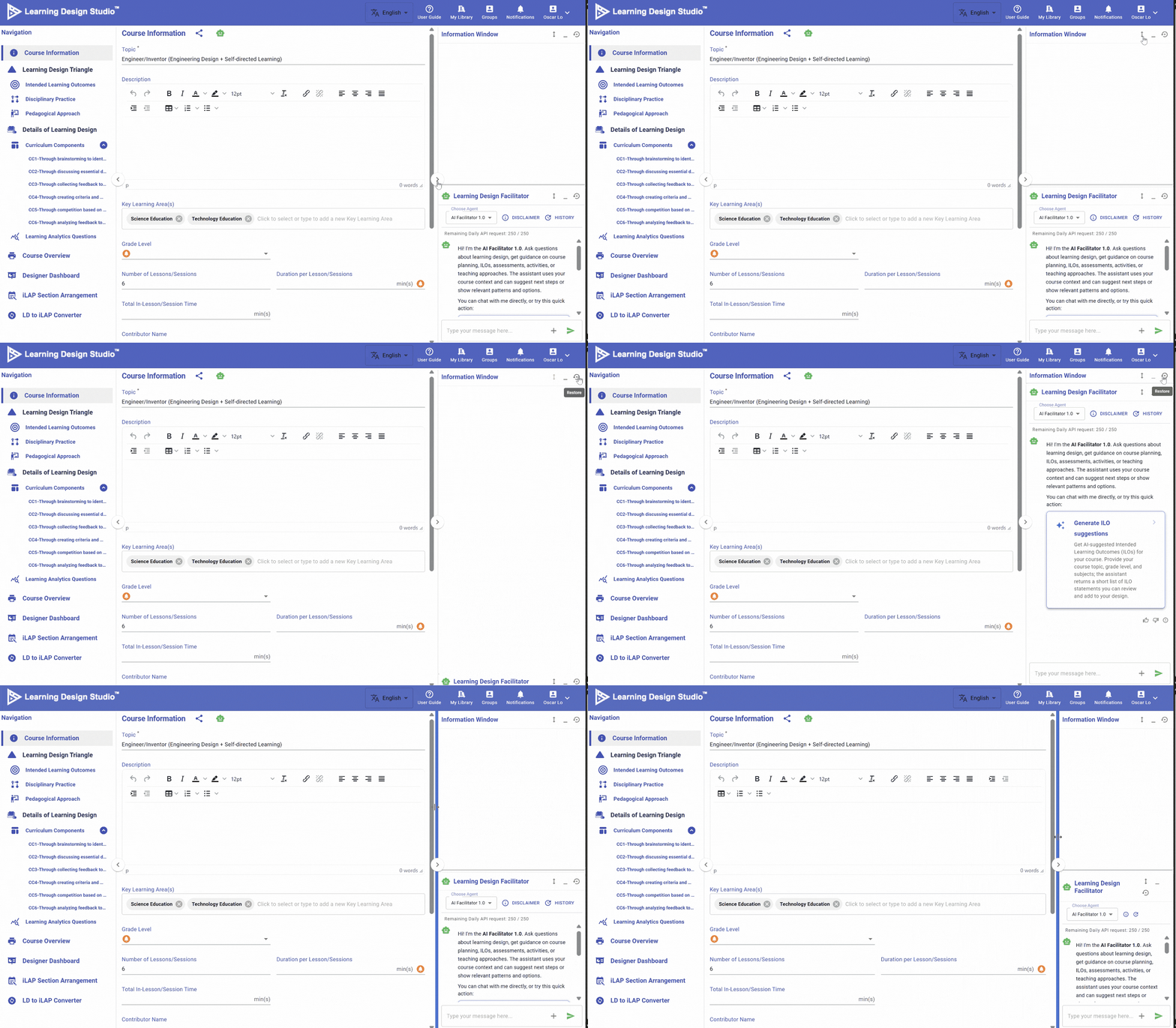
Figure 3.3 Panel-Based Interface
You can drag the edge of a panel to resize it, or click the button to collapse or expand the panel.
3.2 Learning Design Facilitator and Information Window
What is Learning Design Facilitator (LDF)?
To help you create your learning design, the IDEALS team has developed the Learning Design Facilitator (LDF), which includes both the LDS Assistant and Chatbot.
The table below provides an overview of the LDF’s user interface.
|
Figure 3.4: Interface of Learning Design Facilitator (1) |
LDS ASSISTANT When creating a learning design in the LDS, you will work through multiple phases: course level, curriculum component level, and task level. The LDS Assistant provides instructions and tips tailored to your current phase and acts as an interface for accessing the LDS Pattern Library, which offers well-defined templates for you to use in each phase. Further details about the LDS Pattern Library will be introduced in the next section. |
|
Figure 3.5: Interface of Learning Design Facilitator (2) |
CHATBOT
Figure 3.6: Access to Learning Design Facilitator
|
What is Information Window?
Figure 3.7: Interface of Information Window
The Information Window is located in the top right corner. It displays the key information you have inputted or visualizes your learning design. When your learning design becomes more complex, this feature becomes especially valuable, helping you review existing elements and make informed decisions throughout the design process.
3.3 Pattern Library
🌟 For guidance on using the Pattern Library, refer to Chapter 6 - Create a New Design from Patterns
To better support creating a learning design, the IDEALS team developed the Pattern Library, which provides pre-defined, hands-on resources for IDEALS users.
Please be aware of this button. When you see it, the Learning Design Studio can offer patterns for you to use.
1. Course-level Patterns
Figure 3.8: Course-level Patterns
The LDS provides course-level patterns that offer most of the information needed to complete the learning design for a specific topic, such as engineering design. Each course-level pattern includes intended learning outcomes, a disciplinary practice and a pedagogical approach, a curriculum component sequence, and learning tasks.
2. Curriculum Component Patterns
| Figure 3.9: Curriculum Component Patterns | |
The LDS provides curriculum component patterns. Each pattern recommends a sequence of tasks for a specific phase of learning, designed to scaffold student learning.
3. Task Patterns
| Figure 3.10: Task Patterns | |
The LDS provides task patterns. Each pattern specify the details of each task—such as task type, delivery mode, e-learning tool, and learning resources.
4. Intended Learning Outcomes (ILOs) Patterns
| Figure 3.11: Intended Learning Outcomes Patterns | |
The LDS provides intended learning outcome patterns for all four categories of ILOs across different subjects.
5. Disciplinary Practice (DP) Patterns
Figure 3.12: Disciplinary Practice Patterns
The LDS provides disciplinary practice patterns such as Engineering Design and Scientific Investigation.
6. Pedagogical Approach (PA) Patterns
Figure 3.13: Pedagogical Approach Patterns
The LDS provides pedagogical approach patterns such as Self-directed Learning.