# 6.3.3 Creating Curriculum Components (CCs) Part 3

#### **Reviewing and Revising the Existing CCs**

- 

**3. Creating a New CC from CC Patterns**

<table border="1" class="align-center" id="bkmrk-figure-6.xx%3A-adding-" style="border-collapse: collapse; width: 100.049%; border-width: 0px;"><colgroup><col style="width: 50%;"></col><col style="width: 50%;"></col></colgroup><tbody><tr><td class="align-right" style="border-width: 0px;">![image.png](https://ideals-doc.cite.hku.hk/uploads/images/gallery/2025-12/scaled-1680-/boZimage.png)

</td><td style="border-width: 0px;">![image.png](https://ideals-doc.cite.hku.hk/uploads/images/gallery/2025-12/scaled-1680-/gcDimage.png)

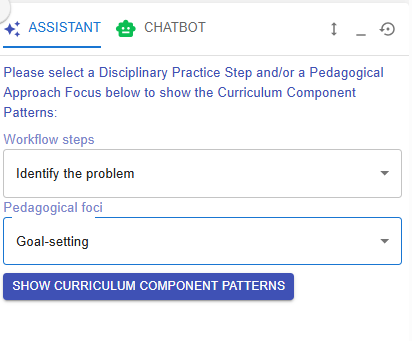
</td></tr><tr><td colspan="2" style="border-width: 0px;">Figure 6.56: Adding a New CC from the CC Patterns (1)</td></tr></tbody></table>

- Since this learning design focuses on creating a product for the elderly, your colleague may argue that brainstorming alone is insufficient. They might recommend adding an interview section to foster a user-centered mindset. In this case, CC Patterns can offer a quick and practical solution.
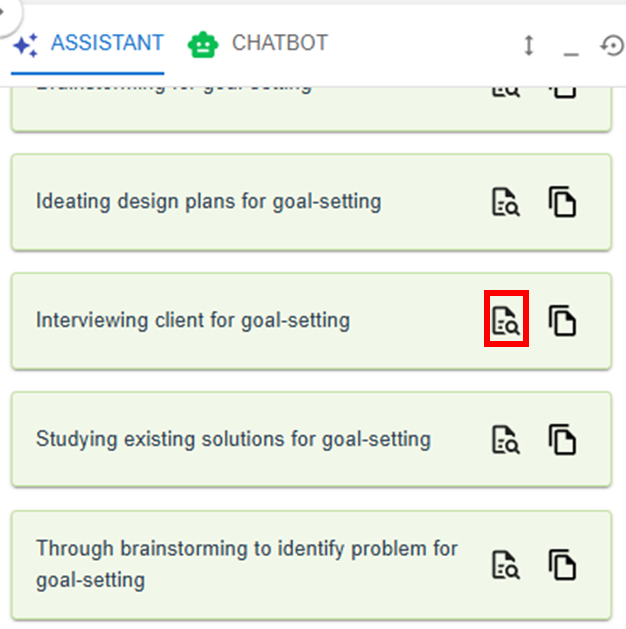
- To retrieve the task pattern related to conducting client interviews, you can select **"Identify problem"** for the workflow steps and **"Goal-setting"** for the pedagogical focus in the Learning Design Facilitator. It will then recommend relevant task patterns for you. You can click the ![image.png](https://ideals-doc.cite.hku.hk/uploads/images/gallery/2025-09/scaled-1680-/UsJimage.png) button to explore the details of the task pattern **"Interviewing client for goal-setting"**.
    
    ![image.png](https://ideals-doc.cite.hku.hk/uploads/images/gallery/2025-12/scaled-1680-/oTnimage.png)
    
    Figure 6.57: Adding a New CC from the CC Patterns (2)
- You can use the targeted CC pattern directly by clicking **"COPY" button** in the pop-up window, or by clicking the ![image.png](https://ideals-doc.cite.hku.hk/uploads/images/gallery/2025-09/scaled-1680-/vDhimage.png) button in the Learning Design Facilitator. The CC pattern details will be auto-filled into the LDS.
- Please refer to the instructions under **[2. Reviewing the CC Patterns and Task Patterns](https://ideals-doc.cite.hku.hk/books/learning-design-studio-user-guide/page/632-creating-curriculum-components-ccs-part-2)** to update your newly created CC.

\* You can continue adding more tasks to complete your Curriculum Component (CC), and add additional CCs to finalize your course design by repeating the steps mentioned above.

 **Additional: Information Window, and Header**

- There is some additional information to help you analyse the learning design.

<table border="1" id="bkmrk-item-description-exa-1" style="border-collapse: collapse; width: 102.857%; height: 1796.26px; border-width: 1px;"><colgroup><col style="width: 19.1874%;"></col><col style="width: 47.4323%;"></col><col style="width: 33.3694%;"></col></colgroup><tbody><tr style="height: 46.5625px;"><th style="height: 46.5625px; border-width: 1px; vertical-align: middle;"><span style="color: rgb(255, 255, 255);">**Item**</span>

</th><th style="border-width: 1px; vertical-align: middle; height: 46.5625px;"><span style="color: rgb(255, 255, 255);">**Description**</span>

</th><th style="height: 46.5625px; border-width: 1px; vertical-align: middle;"><span style="color: rgb(255, 255, 255);">**Example**</span>

</th></tr><tr style="height: 450.391px;"><td style="height: 450.391px; border-width: 1px; vertical-align: middle;">1. Information Window</td><td style="border-width: 1px; vertical-align: middle; height: 450.391px;">![image.png](https://ideals-doc.cite.hku.hk/uploads/images/gallery/2025-12/scaled-1680-/EqYimage.png)

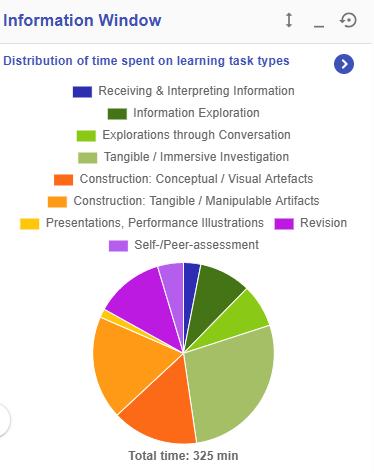
<span style="color: #444444;">Figure 6.58: Information Window in the CC Section</span>

</td><td style="height: 450.391px; border-width: 1px; vertical-align: middle;">In the CC section, the information window will visualise your overall CC design with the pie chart

- Distribution of time spent on learning task types
- Distribution of number of iLAP tools adopted
- Distribution of time spent on delivery modes

</td></tr><tr><td style="border-width: 1px; vertical-align: middle;">2. Header</td><td colspan="2" style="border-width: 1px; vertical-align: middle;">  
[![image.png](https://ideals-doc.cite.hku.hk/uploads/images/gallery/2025-12/scaled-1680-/OtMimage.png)](https://ideals-doc.cite.hku.hk/uploads/images/gallery/2025-12/scaled-1680-/OtMimage.png)

  
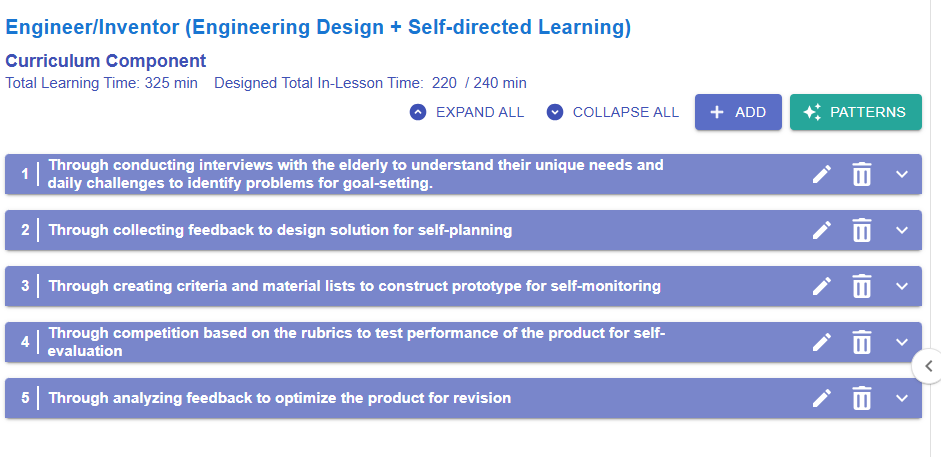
<span style="color: #444444;">Figure 6.59: Example of a Curriculum Component Sequence</span>

**Total Learning Time: 325 min**

- It includes the time spent on all pre-class, in-class, and after-class activities.

 **Designed Total In-Lesson Time: 220 / 240 min**

- 220 min is the time spent on in-class activities.
- 240 min is the possible in-class time allocated for this course

 **Expand all**

- Expand all the CC items to see the details

 **Collapse all**

- Collapse all the CC items to hide the details

</td></tr></tbody></table>