# 6.2.1 Intended Learning Outcomes (ILOs)

The course-level pattern **Engineer/Inventor (Engineering Design + Self-directed Learning)** has provided some intended learning outcome patterns for you. However, you still need to customise the patterns or add new ILOs to complete your learning design.

[![image.png](https://ideals-doc.cite.hku.hk/uploads/images/gallery/2025-12/scaled-1680-/tSjimage.png)](https://ideals-doc.cite.hku.hk/uploads/images/gallery/2025-12/scaled-1680-/tSjimage.png)

Figure 6.4: Learning Design Triangle Section - Intended Learning Outcomes

For the following part, you will explore how to add the new ILOs to the design.

🌟 For guidance on developing strong ILOs, refer to **[Chapter 2.2 - Intended Learning Outcomes (ILOs)](https://ideals-doc.cite.hku.hk/books/learning-design-studio-user-guide/page/22-intended-learning-outcomes-ilos)**

In the LDS, there are four categories of Intended Learning Outcomes (ILOs):

- **Disciplinary Knowledge**: The core concepts, theories, facts, and frameworks that are recognized and developed within a particular field or area of study.
- **Disciplinary Skills**: The specific techniques, methods, and competencies associated with a particular field or area of study.
- **Generic Skills**: The broad abilities that help people succeed in education, work, and daily life, regardless of a particular field or area of study.
- **Values &amp; Attitudes**: The beliefs, principles, and dispositions that guide a person's behavior, decision-making, and interactions with others.

#### **Adding a New ILO** 

There are two ways to add a new ILO: (1) using the ILO patterns or (2) writing it yourself.

**1. Use the ILO Patterns**

- You will use our pre-defined pattern to indicate what students is expected to achieve as a result of the learning process.

![image.png](https://ideals-doc.cite.hku.hk/uploads/images/gallery/2025-12/scaled-1680-/TXoimage.png)

Figure 6.5: Intended Learning Outcomes - Values &amp; Attitude

- For example, if you want to create an ILO for the **Values &amp; Attitude** category, we can create one by using the ILO patterns.

<table border="1" id="bkmrk-figure-6.13%3A%C2%A0-the-il" style="border-collapse: collapse; width: 100%; border-width: 0px;"><colgroup><col style="width: 50%;"></col><col style="width: 50%;"></col></colgroup><tbody><tr><td style="border-width: 0px;">![image.png](https://ideals-doc.cite.hku.hk/uploads/images/gallery/2025-12/scaled-1680-/zjZimage.png)</td><td style="border-width: 0px;">![image.png](https://ideals-doc.cite.hku.hk/uploads/images/gallery/2025-12/scaled-1680-/lzximage.png)</td></tr><tr><td class="align-center" colspan="2" style="border-width: 0px;">Figure 6.6: The ILOs Patterns in the LDS Facilitator

- After selecting the targeted ILO category in the Learning Design Facilitator, click the **"SHOW INTENDED LEARNING OUTCOME PATTERNS"** button to view suggested patterns. Alternatively, you can click the ![image.png](https://ideals-doc.cite.hku.hk/uploads/images/gallery/2025-12/scaled-1680-/Txiimage.png) button to instantly activate the pattern list.
- By clicking the ![image.png](https://ideals-doc.cite.hku.hk/uploads/images/gallery/2025-09/scaled-1680-/UsJimage.png)<span style="text-align: center;"> button, you can explore the details of the targeted ILO. </span>

![image.png](https://ideals-doc.cite.hku.hk/uploads/images/gallery/2025-09/scaled-1680-/pngimage.png)

Figure 6.7: Details of the Targeted ILO Pattern (1)

- You can use the targeted ILO pattern directly by clicking **"COPY"** button in the new pop-up window, or by clicking the ![image.png](https://ideals-doc.cite.hku.hk/uploads/images/gallery/2025-09/scaled-1680-/vDhimage.png) button in the Learning Design Facilitator. The ILO pattern details will be auto-filled into the LDS.

![image.png](https://ideals-doc.cite.hku.hk/uploads/images/gallery/2025-12/scaled-1680-/zrpimage.png)

  
Figure 6.8: Details of the Targeted ILO Pattern (2)

- After copying the ILO pattern, you can see the ILO "Students learn to respect others, including accepting and respecting others' viewpoints and differences." appear in the ILO builder.
- To better fit our course context and the Bloom‘s Taxonomy, we can modify it to: “<span style="color: rgb(224, 62, 45);">Demonstrate willingness to accept and respect the elderly, including accepting and respecting their viewpoints and differences.</span>”

</td></tr></tbody></table>

**2. Writing it Yourself**

- In addition to using patterns, you may write a full ILO yourself<span style="color: rgb(68, 68, 68);">.</span>

![image.png](https://ideals-doc.cite.hku.hk/uploads/images/gallery/2025-12/scaled-1680-/EH2image.png)

Figure 6.9: Adding a New ILO

- If you have not added any ILOs before, you can click the ![image.png](https://ideals-doc.cite.hku.hk/uploads/images/gallery/2025-12/scaled-1680-/Uitimage.png) or ![image.png](https://ideals-doc.cite.hku.hk/uploads/images/gallery/2025-09/scaled-1680-/yp4image.png) button to add a new ILO.

![image.png](https://ideals-doc.cite.hku.hk/uploads/images/gallery/2025-12/scaled-1680-/082image.png)

Figure 6.10: Interface of the ILO Builder (1)

- We will review each field in the ILO Builder below.

<table border="1" id="bkmrk-1.-remember---recall" style="border-collapse: collapse; width: 100%; height: 882.201px; border-width: 0px;"><colgroup><col style="width: 99.9762%;"></col></colgroup><tbody><tr style="height: 46.5625px;"><td style="border-width: 0px; vertical-align: middle; height: 46.5625px;">**1. Subject/Discipline(s)**

 ![image.png](https://ideals-doc.cite.hku.hk/uploads/images/gallery/2025-09/scaled-1680-/Wlaimage.png)

Figure 6.11: Interface of the ILO Builder (2)

- Select the appropriate discipline(s) for each ILO as needed.

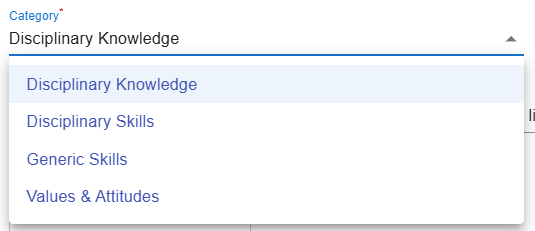
</td></tr><tr style="height: 80.0852px;"><td style="border-width: 0px; vertical-align: middle; height: 80.0852px;">**2. Category**

![image.png](https://ideals-doc.cite.hku.hk/uploads/images/gallery/2025-09/scaled-1680-/AeSimage.png)

Figure 6.12: Interface of the ILO Builder (3)

- Select the category of ILO: **Disciplinary Knowledge, Disciplinary Skills, Generic Skills, or Values &amp; Attitudes**.

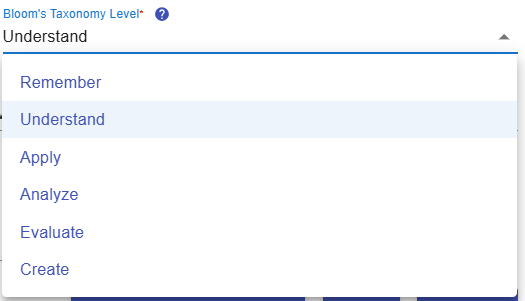
</td></tr><tr style="height: 565.511px;"><td style="border-width: 0px; vertical-align: middle; height: 565.511px;">**3. Bloom's Taxonomy Level**

![image.png](https://ideals-doc.cite.hku.hk/uploads/images/gallery/2025-09/scaled-1680-/9ifimage.png)

Figure 6.13: Interface of the ILO Builder (4)

- Select the Bloom’s Taxonomy level that best reflects the intended skill, knowledge, or value for this outcome (e.g., Remember, Apply, Evaluate).
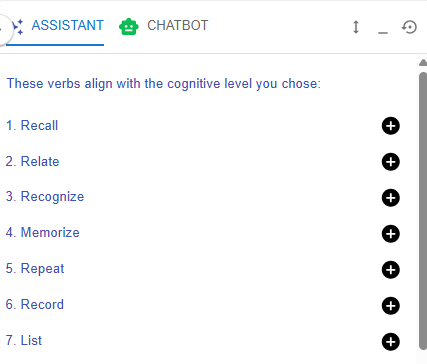
![image.png](https://ideals-doc.cite.hku.hk/uploads/images/gallery/2025-12/scaled-1680-/F3fimage.png)  
  
Figure 6.14: Writing a ILO with the Learning Design Facilitator

- After selecting the Bloom’s Taxonomy level, the Learning Design Facilitator will recommend suitable action verbs to help you formulate your ILOs.
- Choose the appropriate action verb that best reflects the skill, knowledge, or value targeted by your ILO.

</td></tr><tr style="height: 96.9176px;"><td style="border-width: 0px; vertical-align: middle; height: 96.9176px;">**4. ILO and Learning Design Facilitator**

![image.png](https://ideals-doc.cite.hku.hk/uploads/images/gallery/2025-12/scaled-1680-/5r4image.png)

Figure 6.15: Interface of the ILO Builder (5)

- Click the Learning Design Facilitator button![image.png](https://ideals-doc.cite.hku.hk/uploads/images/gallery/2025-12/scaled-1680-/f3Wimage.png)to request feedback from the chatbot on your ILO.
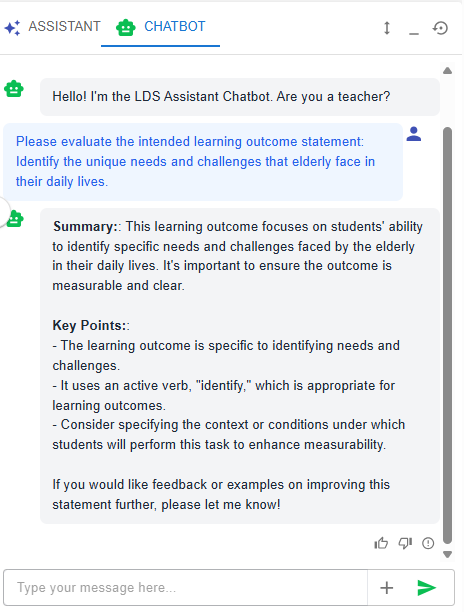
![image.png](https://ideals-doc.cite.hku.hk/uploads/images/gallery/2025-12/scaled-1680-/eAoimage.png)

Figure 6.16: Writing a ILO with the Chatbot

</td></tr><tr style="height: 46.5625px;"><td style="border-width: 0px; vertical-align: middle; height: 46.5625px;">**5. Sub-ILO(s)**

![image.png](https://ideals-doc.cite.hku.hk/uploads/images/gallery/2025-09/scaled-1680-/5Yfimage.png)

Figure 6.17: Interface of the ILO Builder (6)

- To provide greater clarity, an ILO can be subdivided into more detailed sub-ILOs as needed.

</td></tr></tbody></table>