# 1.4 Navigating the Gateway Page

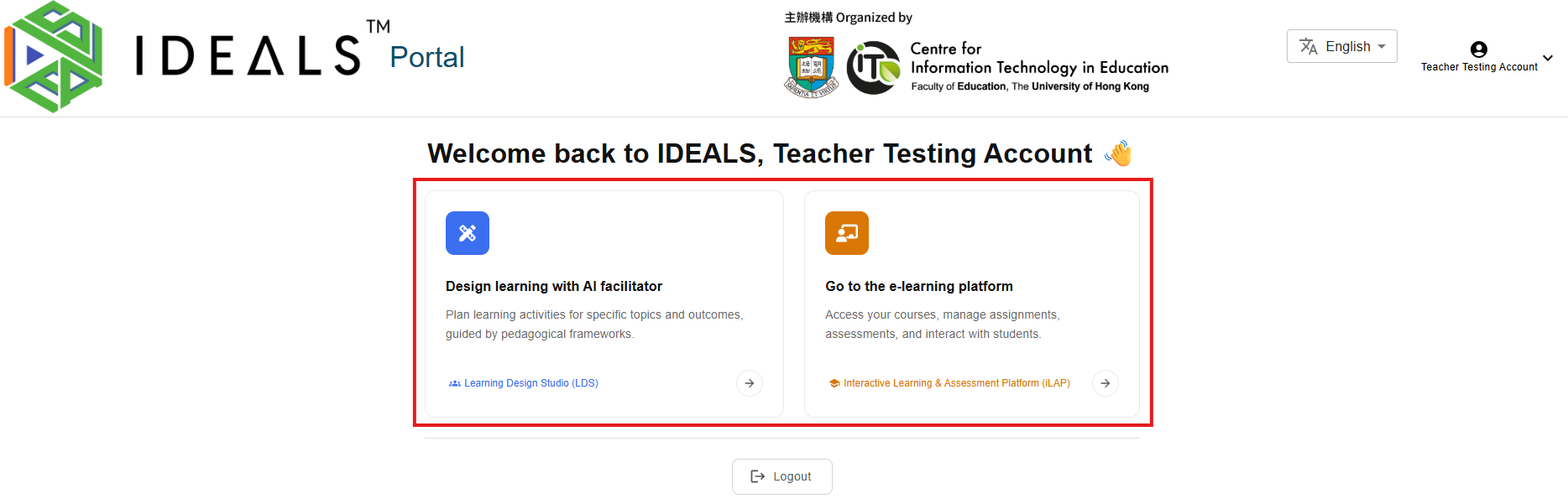
<div class="qwen-markdown-paragraph" dir="ltr" id="bkmrk-after-completing-ema"><span class="qwen-markdown-text">After completing email verification, you'll be redirected to the IDEALS Portal Gateway Page. You'll see a welcome message: </span>**<span class="qwen-markdown-text">"Welcome back to IDEALS, \[Your Name\] 👋"</span>**</div><div class="qwen-markdown-space" id="bkmrk-">  
</div><div class="qwen-markdown-space" id="bkmrk--1">[![image.png](https://ideals-doc.cite.hku.hk/uploads/images/gallery/2026-07/scaled-1680-/tjVimage.png)](https://ideals-doc.cite.hku.hk/uploads/images/gallery/2026-07/tjVimage.png)</div><div class="qwen-markdown-paragraph" data-spm-anchor-id="a2ty_o01.29997173.0.i3.460c55fbYuHwyl" dir="ltr" id="bkmrk-if-you%27re-a-teacher-"><span class="qwen-markdown-text">If you're a teacher at EdCity and haven't verified your email, you will not be able to access this page. Please complete step 1.3 first.</span></div>### <span class="qwen-markdown-text">For Teachers</span>

<div class="qwen-markdown-paragraph" dir="ltr" id="bkmrk-on-the-gateway-page%2C"><span class="qwen-markdown-text">On the Gateway Page, you will see two options to access different platforms:</span></div><div class="qwen-markdown-space" id="bkmrk--2">  
</div>1. **<span class="qwen-markdown-text">Design learning with AI facilitator</span>**<span class="qwen-markdown-text"> (Blue icon)</span>
    - <span class="qwen-markdown-text">Description: "Plan learning activities for specific topics and outcomes, guided by pedagogical frameworks."</span>
    - <span class="qwen-markdown-text">Click this card or the </span>**<span class="qwen-markdown-text">"Learning Design Studio (LDS)"</span>**<span class="qwen-markdown-text"> link to access LDS</span>
2. **<span class="qwen-markdown-text">Go to the e-learning platform</span>**<span class="qwen-markdown-text"> (Orange icon)</span>
    - <span class="qwen-markdown-text">Description: "Access your courses, manage assignments, assessments, and interact with students."</span>
    - <span class="qwen-markdown-text">Click this card or the </span>**<span class="qwen-markdown-text">"Interactive Learning &amp; Assessment Platform (iLAP)"</span>**<span class="qwen-markdown-text"> link to access iLAP-IDEALS</span>

### <span class="qwen-markdown-text">For Students</span>

<div class="qwen-markdown-paragraph" dir="ltr" id="bkmrk-if-you%27re-a-student-"><span class="qwen-markdown-text">If you're a student at EdCity, you will see only the </span>**<span class="qwen-markdown-text">"Go to the e-learning platform"</span>**<span class="qwen-markdown-text"> option to access iLAP-IDEALS.</span></div><div class="qwen-markdown-space" id="bkmrk--3">  
</div><div class="qwen-markdown-paragraph" dir="ltr" id="bkmrk-stay-on-this-screen-"><span class="qwen-markdown-text">Stay on this screen and continue to the next step.</span></div><div class="qwen-markdown-space" id="bkmrk--4">  
</div><div class="qwen-markdown-paragraph" data-spm-anchor-id="a2ty_o01.29997173.0.i0.460c55fbYuHwyl" dir="ltr" id="bkmrk-note%3A-the-login-sess">**<span class="qwen-markdown-text">Note:</span>**<span class="qwen-markdown-text"> The login session expires after 1 day, and you'll need to log in again.</span></div>